
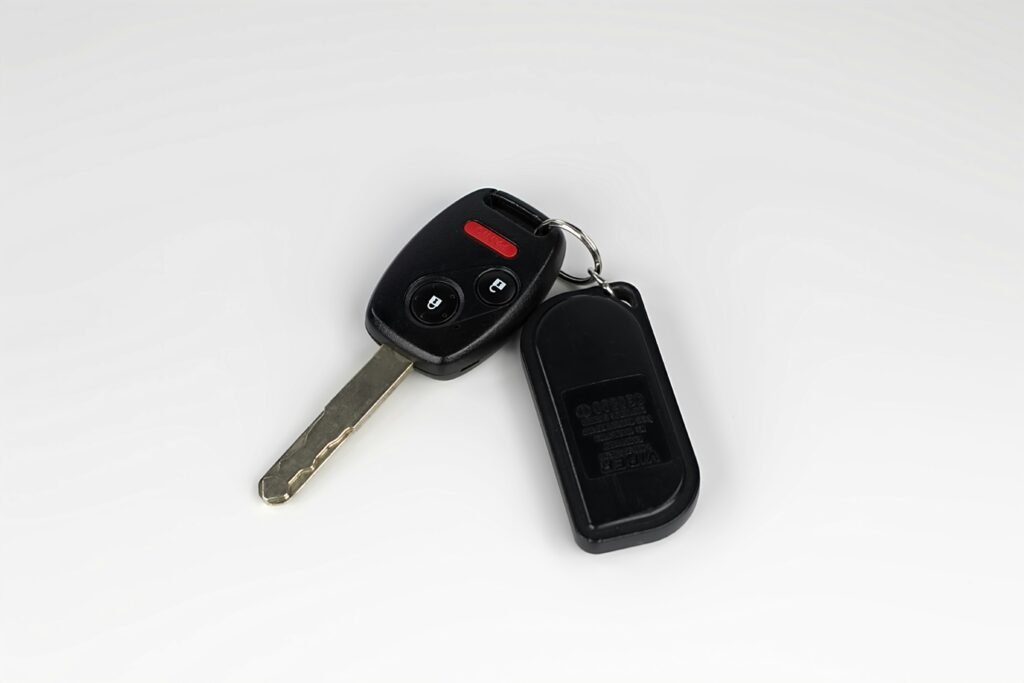
A dead key fob battery is one of the most common minor car problems — and one of the easiest to fix yourself in under five minutes with a coin or small flathead screwdriver. This guide covers everything: what battery your key fob takes, how to open key fobs from every major brand, step-by-step battery replacement for Subaru, Honda, Toyota, Nissan, and Ford, what to do if the key fob still does not work after a new battery, how long key fob batteries last, and how to get into your car if your key fob dies before you can replace the battery.
For home battery guides including 1.5V batteries, smoke detector batteries, and rechargeable battery types, see our article on 1.5V battery guide — AA voltage, D battery voltage, dimensions, and battery sizes explained.
What Battery Does a Key Fob Take?
The vast majority of car key fobs use a CR2032 coin cell battery — a 3-volt lithium disc battery measuring 20mm in diameter and 3.2mm thick. Some key fobs use other coin cell sizes depending on the manufacturer and model year. Here is a quick reference chart:
| Battery Type | Voltage / Size | Common Key Fobs That Use It |
| CR2032 | 3V / 20mm × 3.2mm | Most Subaru, Honda, Toyota, Nissan, Ford, GM, Hyundai |
| CR2025 | 3V / 20mm × 2.5mm | Older Toyota, some Lexus, some Honda models |
| CR2016 | 3V / 20mm × 1.6mm | Some Mazda, BMW, Mini Cooper fobs |
| CR1620 | 3V / 16mm × 2.0mm | Some Nissan and Infiniti models |
| CR2450 | 3V / 24mm × 5.0mm | Some Ford Smart Key fobs; Cadillac |
| Panasonic CR2032 | 3V / 20mm × 3.2mm | Recommended brand for all CR2032 fobs |
To confirm your exact battery type: check the owner’s manual (battery type is listed under key fob maintenance), open the key fob and look at the existing battery (the type is printed on its face), or search your exact make, model, and year online. The battery type is always printed on the old battery — note it before discarding.
How to Open a Key Fob — General Method
Most key fobs open using one of three methods:
- Coin method: A slot on the edge of the fob accepts a coin (quarter works well) — insert and twist to pop the two halves apart
- Flathead screwdriver: Insert a thin flathead screwdriver into the seam and gently pry — wrap the tip in a cloth to avoid scratching the plastic
- Release button: Some key fobs have a small release button or sliding tab — press or slide to separate the case
Work around the entire seam once you find the initial gap — do not force one spot, as the case clips at multiple points. Key fob cases are plastic and crack if forced too aggressively at a single point.
How to Change Battery in Subaru Key Fob
Subaru Key Fob Battery Type
Most Subaru key fobs (2010-2026 models) use a CR2032 battery. This includes Subaru Outback, Forester, Impreza, Crosstrek, Legacy, Ascent, and WRX key fobs across most model years. Older Subaru models (pre-2010) may use a CR2025 — check your existing battery.
Subaru Key Fob Battery Replacement — Step by Step
- Locate the small slot or seam on the side of the Subaru key fob
- Insert a coin into the slot and twist gently, or use a thin flathead screwdriver wrapped in cloth to pry at the seam
- The case will separate into two halves — the battery is visible in one half
- Note the orientation of the existing battery (+ side up or + side down) before removing
- Use a coin or small tool to pop the old CR2032 battery out of its retaining clip
- Insert the new CR2032 battery in the same orientation — positive (+) side matches the marking in the holder
- Snap the two case halves back together firmly until all clips engage
- Test: press any button — the car should respond. If not, see the troubleshooting section below
Subaru note: Some newer Subaru models with the push-button start may require re-syncing the fob after battery replacement. Hold the fob close to the start button and press — the car’s proximity sensor should recognize it even if the battery is low enough that buttons do not work at range.
Honda Key Fob Battery Replacement
Honda Key Fob Battery Type
Honda key fobs from 2000-2026 (Civic, Accord, CR-V, Pilot, HR-V, Odyssey, Ridgeline) primarily use CR2032 batteries. Some older Honda models from the early 2000s used CR2025. Honda Smart Keys (flip-style key with the metal key inside) use CR2032. Honda proximity keys (push-button start) also use CR2032 in most configurations.
Honda Key Fob Battery Replacement — Step by Step
- On Honda flip-style key fobs: push the small release button on the side to slide out the metal key — this reveals a slot in the key fob body
- Insert a flathead screwdriver into the slot exposed after removing the key and gently pry the case open
- On Honda non-flip key fobs: use a coin in the seam slot on the side or back
- Remove the old CR2032 battery — note which side faces up (+ typically faces up on Honda fobs)
- Insert the new CR2032 battery in the same orientation
- Snap the case shut — for flip-style fobs, slide the metal key back into place
- Test all buttons — lock, unlock, trunk, and panic
Honda programming note: Honda key fobs generally do not require reprogramming after a battery change — the fob retains its programming. If the fob does not work after battery replacement, try the troubleshooting steps in the section below.
How to Replace Toyota Key Fob Battery
Toyota Key Fob Battery Type
Toyota key fob battery type varies by model and year: most 2010-2026 Toyota models (Camry, Corolla, RAV4, Highlander, Tacoma, Tundra, Prius, 4Runner) use CR2032. Some older Toyota models and certain Lexus fobs use CR2025 or CR2016 — always verify by looking at the existing battery before purchasing a replacement.
Toyota Key Fob Battery Replacement — Step by Step
- For Toyota smart key (push-button start): locate the small release button on the back of the fob and slide it to reveal the hidden mechanical key
- Remove the mechanical key by pulling it out — this exposes a slot in the back of the fob case
- Insert a flathead screwdriver into the exposed slot and gently pry the case open
- The battery is typically held in a small tray or clip inside — note the orientation
- Remove the old battery and insert the new CR2032 with the same orientation (+ side usually faces toward the buttons)
- Snap the case back together and reinsert the mechanical key
- Test all functions. If the Toyota smart key does not respond at range but works when held directly against the start button, the battery is still slightly weak — replace it
Toyota Prius note: The Prius smart key uses CR2032 and follows the same replacement process. After replacement, hold the fob against the power button to start if the range is initially limited — the system re-establishes full range after a few uses.
How to Change Battery on Nissan Key Fob
Nissan Key Fob Battery Type
Nissan key fobs (Altima, Sentra, Rogue, Pathfinder, Murano, Frontier, Titan, 370Z) use CR2032 in most 2009-2026 models. Some Nissan Intelligent Key models and certain Infiniti key fobs use CR1620 — verify with your existing battery. The Nissan Intelligent Key (push-button start proximity key) universally takes CR2032 across most model years.
Nissan Key Fob Battery Replacement — Step by Step
- Press the release button on the side of the Nissan key fob and slide out the hidden emergency key
- The emergency key slot reveals the seam of the fob — insert a flathead screwdriver wrapped in cloth
- Gently pry around the seam to separate the case halves
- The CR2032 battery is in a holder inside — use your fingernail or a non-conductive tool to pop it out
- Note the orientation: on most Nissan fobs the + (positive) side faces down toward the circuit board
- Insert the new battery with the same orientation — press gently until it seats in the holder
- Snap the case back together and reinsert the emergency key
- Test: the Nissan Intelligent Key should lock/unlock doors at normal range
Nissan reprogramming: If your Nissan key fob does not work after battery replacement, it may have lost its programming. Nissan intelligent keys can sometimes be reprogrammed at home — check your owner’s manual for the specific procedure, which typically involves a sequence of door and ignition actions. If home reprogramming fails, a dealer or locksmith can reprogram it.
How to Change Battery in Ford Key Fob
Ford Key Fob Battery Type
Ford key fob batteries vary by model and type: most Ford standard key fobs (F-150, Mustang, Explorer, Escape, Edge, Bronco, Ranger) use CR2032. Ford Smart Keys (larger proximity fobs for push-button start) may use CR2032 or CR2450 depending on the model year — the CR2450 is larger and thicker than the CR2032. Check your existing battery before purchasing. Ford MyKey fobs use the same battery as standard fobs.
Ford Standard Key Fob Battery Replacement — Step by Step
- On Ford standard key fobs: look for a small notch or slot on the back or side of the fob
- Insert a coin into the notch and twist, or gently pry with a flathead screwdriver
- The fob splits into front and back halves — the battery is inside
- Note the battery orientation — on most Ford fobs the negative (-) side faces the circuit board
- Pop out the old battery and insert the new CR2032 in the same orientation
- Snap the halves back together firmly
- Test all buttons
Ford F-150 Key Fob Battery — Specific Notes
The Ford F-150 key fob (2015-2026 models) uses a CR2032 battery. The F-150’s intelligent access key fob has a slightly different opening method: push down on the back panel while sliding toward the key ring end — the back panel slides off rather than popping apart at a seam. Some F-150 smart key fobs use two CR2032 batteries stacked — check when you open it. Replace both if you find two, even if only one appears dead.
Key Fob Battery Replacement — Quick Reference Table
| Brand | Common Battery | How to Open | Reprogramming Needed? |
| Subaru | CR2032 | Coin/pry at seam | Usually no; proximity fobs: hold to button |
| Honda | CR2032 | Remove key → pry slot | No — retains programming |
| Toyota | CR2032 (CR2025 older) | Remove emergency key → pry | No; hold fob to start button if needed |
| Nissan | CR2032 (CR1620 some) | Remove emergency key → pry | Sometimes; see owner’s manual |
| Ford | CR2032 (CR2450 smart key) | Coin/pry; F-150 slides | Usually no |
| Chevrolet/GMC | CR2032 | Pry at seam | Usually no |
| Hyundai/Kia | CR2032 | Remove key → pry | Usually no |
| BMW | CR2025 or CR2032 | Slide or pry | Sometimes needs dealer programming |
| Mercedes-Benz | CR2025 or CR2032 | Pry at seam | Sometimes; varies by model |
Key Fob Not Working After Battery Change — Troubleshooting
If your key fob does not work after replacing the battery, work through these steps:
Step 1 — Verify Battery Orientation
The most common cause of a non-working fob after battery replacement is the battery inserted backwards. Open the fob again and confirm the positive (+) and negative (-) sides match the markings in the battery holder. On most fobs, the + side of the CR2032 (the flat side with the brand name) faces away from the circuit board — but this varies. Look for + and – markings in the battery compartment.
Step 2 — Check Battery Contact Quality
Gently bend the metal battery contacts slightly toward the center to ensure they make firm contact with the battery. Over time, contacts can flex outward and lose reliable contact with the battery terminals. Be careful — overbending can break a contact.
Step 3 — Verify It Is a New Battery
CR2032 batteries have a shelf life of 5-10 years but can be defective or already partially discharged if stored improperly. Try a fresh battery from a sealed package — Panasonic and Energizer are reliable brands. Avoid bargain packs of unknown-brand CR2032 batteries, which frequently have lower actual capacity than advertised.
Step 4 — Reprogram the Key Fob
Some key fobs lose their programming when the battery is completely dead (not just weak) before replacement. Reprogramming procedures vary by make and model — check your owner’s manual for the specific sequence. Many can be done at home; some require a dealer or locksmith with diagnostic equipment. Dealer reprogramming typically costs $50-150 depending on the brand.
Step 5 — Check for Physical Damage
Inspect the circuit board inside the fob for corrosion (greenish discoloration on contacts), cracked solder joints, or physical damage from drops. Corrosion from a leaking battery can damage the circuit board permanently — in this case, the fob needs replacement rather than just a new battery.
How to Get Into Your Car if Key Fob Battery Is Dead
If your key fob battery dies and you cannot press the button to unlock the car, here is what to do:
- Use the hidden mechanical key: Almost all modern key fobs contain a hidden emergency key — press the small release button and slide it out. This physical key fits the door lock cylinder (usually on the driver’s door) — insert and turn to unlock manually
- Door lock cylinder: The driver’s door lock cylinder is often hidden under a small cover or cap on newer vehicles — pop the cover off to access the cylinder
- Push-button start with dead fob: Hold the key fob directly against the start button — most push-button start systems have a backup sensor that reads the fob’s passive RFID chip even when the active battery is dead
- Call roadside assistance: If no mechanical key is available, AAA or your vehicle’s roadside assistance can help
How Long Do Key Fob Batteries Last?
Key fob batteries typically last 2-4 years with normal use. Several factors affect lifespan:
| Factor | Effect on Battery Life |
| Button presses per day | More presses = faster drain; heavy use shortens life to 1-2 years |
| Passive entry system | Cars with proximity sensing constantly ping the fob — drains faster than button-only fobs |
| Temperature extremes | Very hot or very cold environments accelerate battery drain |
| Battery brand quality | Name-brand (Panasonic, Duracell, Energizer) CR2032 lasts longer than generic |
| Storing keys near electronics | Electromagnetic interference can cause unnecessary fob activation |
| Passive RFID chip | Low passive draw; does not significantly affect battery life |
Signs your key fob battery is getting low: reduced range (you need to be closer to the car than usual), buttons require multiple presses, or the fob works intermittently. Replace the battery at first signs of weakness — do not wait until it completely dies and leaves you stranded.
For home battery guides including 9V smoke detector batteries, 1.5V battery types, and rechargeable options, see our article on smoke detector battery guide — what battery, how to change, and how long they last.
For CR2032 battery purchasing options, see Panasonic CR2032 batteries — manufacturer page. For key fob reprogramming guides by make and model, see The Keyless Shop — key fob programming instructions.
Bottom Line
| Most common key fob battery | CR2032 (3V coin cell) — used by Subaru, Honda, Toyota, Nissan, Ford, and most others |
| Subaru key fob battery | CR2032 — coin/pry at seam; no reprogramming usually needed |
| Honda key fob battery | CR2032 — remove flip key then pry; retains programming after swap |
| Toyota key fob battery | CR2032 (CR2025 on older models) — remove emergency key then pry |
| Nissan key fob battery | CR2032 (CR1620 on some) — remove emergency key then pry; may need reprogramming |
| Ford key fob battery | CR2032 or CR2450 (Smart Key) — coin/pry; F-150 slides open |
| Fob not working after swap | Check battery orientation first; then contacts; then reprogram |
| Dead fob emergency | Use hidden mechanical key in door cylinder; hold fob to start button |
| Battery life | 2-4 years typical; replace at first signs of reduced range |
Frequently Asked Questions
What battery does a key fob take?
Most car key fobs use a CR2032 battery — a 3-volt lithium coin cell measuring 20mm in diameter and 3.2mm thick. This includes the majority of Subaru, Honda, Toyota, Nissan, Ford, Chevrolet, Hyundai, and Kia key fobs from 2010 to 2026. Some older models use CR2025 (same diameter, slightly thinner) or CR2016 (even thinner). A small number of models use CR1620 or CR2450. To confirm your exact battery type, open the key fob and read the type printed on the existing battery, or check your vehicle’s owner’s manual under key fob maintenance.
How do I change the battery in my key fob?
To change the battery in most key fobs: first locate the seam around the edge of the fob or look for a slot where a coin or small flathead screwdriver can be inserted; pry gently around the seam to separate the two halves; note the orientation of the existing battery before removing it; pop out the old battery and insert a new CR2032 (or your model’s specific type) in the same orientation; snap the case back together; and test by pressing the lock or unlock button. For fobs with a hidden mechanical key (most modern push-button start fobs), remove the emergency key first — it reveals the opening slot. The entire process takes 2-5 minutes.
Why is my key fob not working after battery replacement?
The most common reason a key fob does not work after a battery change is the battery being inserted with the wrong orientation (+ and – reversed). Open the fob and check that the positive side of the CR2032 faces the correct direction — look for + and – markings in the battery compartment. Other causes include poor battery contact (gently bend contacts toward the battery), a defective replacement battery (try a brand-name Panasonic or Energizer CR2032 from a sealed package), or lost programming. If the fob worked before the battery fully died and now does not work with a new battery, it may have lost its programmed pairing with the car — check your owner’s manual for the home reprogramming procedure.
How long do key fob batteries last?
Key fob batteries typically last 2-4 years under normal use. Proximity key fobs (push-button start systems) tend to drain faster than button-only fobs because the car and fob constantly communicate passively even when you are not pressing any buttons. Using a name-brand CR2032 battery (Panasonic, Duracell, Energizer) rather than a generic budget pack extends battery life. Signs of a weakening battery: reduced range (you need to stand closer to the car for the fob to work), buttons requiring multiple presses, or intermittent operation. Replace the battery at first signs of weakness — waiting until it completely fails may mean being locked out.